The creator's guide to outsourcing video editing without losing your style
Learn how to outsource video editing without losing your style. Compare video editing services, explore costs and brief editors.
You open the file your editor sent back. The cuts are clean and the captions are neat. Something still feels off, because it doesn't sound like you.
If this worries you, you're not alone. It's one of the main reasons creators keep editing their own videos, even when it takes up their weekends. They would rather spend extra time editing than lose their personal style.
Losing your voice isn't what outsourcing does. It's what outsourcing without a system does. A good video editing service for YouTube creators can match your pacing, your humour and your look, as long as you hand over your style in a form someone else can follow.
This guide shows you how to outsource YouTube editing step by step: how to get ready, how to pick a partner, how to brief them and how to give feedback that sticks.
In this guide:
- What outsourcing really involves and when to do it
- How to write down your style so an editor can copy it
- Agency vs freelancer and what to look for in a service
- Real 2026 prices
- How to vet, brief, protect and manage your editor
What does it mean to outsource video editing?
Outsourcing video editing means giving your raw footage to an outside editor or team who cuts, polishes and delivers the finished video. You keep the ideas, the script and the final say. You shoot, they shape, you approve.
The loop is simple. You send footage, a short brief and your style guide. You get a first cut back, leave notes and publish once it's right. Format is rarely a problem. Professional teams, including Sociyell, work with MP4, MOV, RAW and ProRes and with footage shot on a phone.
Why video editing matters so much for creators and businesses
Editing is where a video either keeps people or loses them.
vidIQ's 2026 retention guide puts a healthy benchmark at roughly 30% average viewed on long videos, or about 60% of viewers still watching past the 30-second mark. In one of its own examples, a video fell from about 95% of viewers to about 65% in the first half minute, then stayed flat. The drop happened at the start, not the middle.
The usual causes are a slow intro that delays the payoff, or a thumbnail that promises something the video doesn't open with. Both are editing problems. A sharp editor trims the dead air, brings the point forward and makes the opening match the click.
For businesses the stakes are about trust. A rough edit makes a good product look cheap and a polished one makes a small brand look established.
Why outsource video editing instead of doing it in-house?
- Time back. Editing is the part of the job that never ends. Handing it off gives you your weeks back for filming, planning and your audience.
- Consistency. One editor or team following one standard means your uploads look like they belong together.
- Specialist skills. Colour, sound design and motion graphics are separate crafts. You don't have to master them.
- Lower cost than a hire. An in-house editor costs roughly $51,000 to $93,000 a year before equipment, software and benefits.
- Room to grow. You can post more without adding a headcount.
Check the maths with your own numbers. Say you spend 8 hours editing each video and your time is worth $40 an hour. That's $320 of your time per video. An edit in the $300 to $500 range costs about the same in money and you get 8 hours back. If an hour of your time is worth more than that, the case is even stronger.
Signs you're ready:
- A backlog of footage you never get to
- Uploads that keep slipping
- Editing has become the reason you dread making videos
- Growth work (collabs, sponsors, strategy) keeps getting pushed aside
When not to outsource yet:
- You don't have a steady filming routine, so there's nothing to hand over.
- You can't yet describe your style. Do that first, in the next section.
- You have no budget for consistent monthly editing. Starting and stopping makes it harder for an editor to learn you.
What types of video editing can be outsourced?
Almost everything after the shoot can be handed off:
- Basic cleanup: cuts, silence removal, audio fixes
- Story edits: pacing, B-roll and structure
- Graphics: motion graphics, titles and lower thirds
- Finishing: colour grading and sound design
- Captions and subtitles
- Cut-downs: Shorts, Reels and TikTok clips from long videos
- Other formats: podcast, course and client video editing
- Thumbnails (often priced separately)
Keep these with you: your hooks, your scripts, your creative direction and the final approval. Those are your voice. Everything else can be taught.
How to prepare before you outsource
This step decides whether you'll love the first edit or hate it. Style feels like a vibe, but it's really a set of decisions and decisions can be written down.
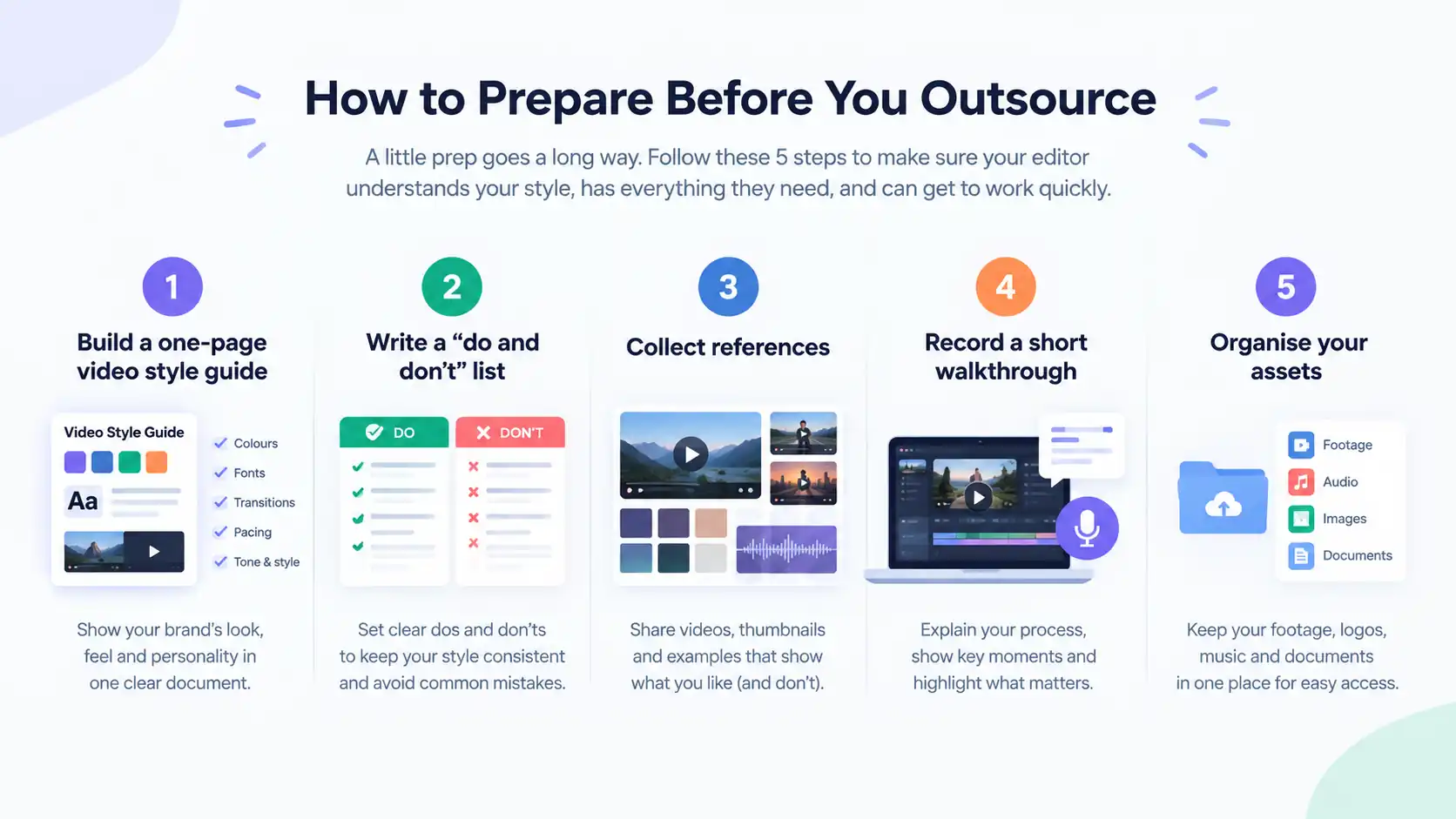
1. Build a one-page video style guide
Fill in each of these. Short answers are fine.
- Captions: font, size, colour, position, whether key words get highlighted
- Colour: warm or cool, how punchy, any signature grade
- Music: genre, how loud under your voice, where it should never appear
- Pacing: how long you let a pause breathe, whether jump cuts are welcome
- Transitions: which ones you use and which are banned
- B-roll: when to use it, what kind, how long each clip stays on screen
- Intro and outro: your standard structure and length
- Formats: aspect ratio and export settings for each platform
2. Write a “do and don't” list
This is the fastest way to prevent the edits you'd hate. For example: Do keep my jokes uncut, even if they run long. Don't zoom in on every sentence. Don't add sound effects to serious points.
3. Collect references
Pick 5 to 10 of your own best-edited videos and 3 to 5 from other creators. Add one line to each saying what you like: “the way captions pop here” or “this pace in the first 20 seconds.” Showing beats describing every time.
4. Record a short walkthrough
Open your editing software, edit one minute of footage and talk through every choice out loud. Use Loom or any screen recorder. Ten minutes of you explaining why you cut there teaches an editor more than a page of notes.
5. Organise your assets
Create one shared folder with your raw files, logo, brand colours, fonts, music library, past thumbnails and a note on your audience. Add your retention graphs if you're comfortable sharing them.
Video editing agency vs freelancer: Which is right for you?
In 2026, freelance editors in the US charge roughly $25 to $150+ per hour, while agencies charge about $100 to $250 per hour. The difference isn't only price. It's what you get for it.
| Basis | Freelancer | Agency | In-house editor | AI-assisted |
|---|---|---|---|---|
| Cost | Lowest per hour | Higher per hour, often packaged | Salary plus tools | Tool fees plus your review time |
| Speed | Depends on their workload | Steady, team-backed | Fastest, always available | Very fast for rough cuts |
| Style control | High once trained | High with a good brief | Highest | Low without a human |
| Scalability | Limited to one person | Easy to add volume | Limited by headcount | Easy |
| Main risk | Gets busy, goes quiet | Poor fit if you're passed between editors | Fixed cost every month | Generic output |
Which fits your stage
- Just starting: a freelancer, so you can learn what you want cheaply.
- Growing: a freelancer or small agency, once you have a style guide and a steady schedule.
- Established or multi-platform: an agency, because you get backup and consistent output across formats.
What to look for in a video editing service for YouTube creators
Searches like “best video editing service for YouTube creators” are really asking a handful of practical questions. Here's how to answer each one.
1. Thumbnail design: Included or extra?
Many services edit the video but charge separately for thumbnails, or don't offer them at all. Ask up front. Whoever makes the thumbnail should talk to whoever edits the video, because the opening seconds need to deliver what the thumbnail promised.
2. Monthly subscription plans
A subscription is a fixed monthly fee for a set amount of editing. It suits you if you post on a schedule. Ask what's included (number of videos, minutes, revision rounds), whether unused volume rolls over and how easy it is to pause or cancel. If a plan locks you in for a year with no trial, be careful.
3. Where to find a YouTube video editor for hire
- Referrals from creators in your niche, which are usually the best source
- Creator communities and groups
- Freelance marketplaces such as Upwork, Fiverr and Contra
- Agencies that specialise in video
Whichever route you pick, a YouTube video editor for hire who has already edited your type of content will learn your style faster.
4. Customer support that actually helps
You'll feel this on a stressful deadline day. Look for a clear reply window, one named contact and a plain revision policy. Send a test question before signing and see how quickly and clearly they answer.
5. Hiring a YouTube editing agency in the USA
If you want a US-based partner, check time zone overlap for live calls, contract terms, invoicing in your currency and who owns the files at the end. Where the team sits matters less than whether they reply when you need them.
6. A quick shortlist checklist
Before you choose a service, make sure you can say yes to each of these:
- They've edited content like mine
- Pricing and revisions are written down
- Thumbnails are either included or clearly priced
- Turnaround is stated, with a real example
- They asked me about my brand before quoting
If you'd rather skip the search: Sociyell's video editing and post-production team handles colour grading, sound design, motion graphics, captions and platform-ready cut-downs for Reels, TikTok, YouTube Shorts and LinkedIn. Standard edits are delivered in 48 to 72 hours, with structured revision rounds built in.
How much does it cost to outsource video editing?
Most editors price in one of four ways:
- Per video: a flat fee for a defined video. Project pricing generally runs from about $300 to $1,500+ per video, depending on type and complexity.
- Per finished minute: YouTube edits run about $20 to $100 per finished minute, social clips about $10 to $50 and motion graphics-heavy work $50 to $200+.
- Hourly: beginners sit near $25 to $45 an hour, intermediate editors around $45 to $85 and senior editors $85 to $150.
- Monthly retainer or subscription: a weekly YouTube schedule of about four videos a month is commonly quoted at $1,700 to $3,500 per month.
For a quick sense of range: a 10 to 20 minute YouTube video typically runs $100 to $2,500, while a short-form clip runs $20 to $500.
What pushes the price up or down
- Complexity: talking head vs story-driven with graphics
- Turnaround: rush jobs cost more
- Revisions: some editors cap them, some don't
- Extras: motion graphics and sound design on top of the base edit
How to budget: multiply your videos per month by the per-video price you've been quoted, then compare it with the hours you'd get back, as in the earlier maths. These are 2026 market ranges and they shift, so get a quote on one of your real videos before you plan around them.
How to choose and vet a video editing partner
1. Review the portfolio properly
Look for work in your niche, edits that keep the pace tight and range. Strong editors can sound like different creators in different videos, which means they can sound like you.
2. Run a paid test edit
Interviews tell you who's good at interviews. A test edit tells you who's good at editing. Give 1 to 2 minutes of your real footage, your style guide and a short brief. Pay for it. A fair rate also filters out people who aren't serious. If you're comparing two editors, give both the same clip.
3. Ask these questions
- What would you want to know about my channel before you started?
- How do you handle notes you disagree with?
- What's your usual turnaround and what happens when you're late?
- How many revision rounds are included?
- Who else will touch my footage?
4. Watch for red flags
- No questions about your brand or audience
- Turnaround promises that sound too good
- No contract, or a vague revision policy
- Reluctance to do a paid test
5. Sort out the contract
Get these in writing: who owns the footage and the final edit, usage rights, NDA terms, payment schedule and how many revisions are included.
How do outsourcing partners maintain brand consistency?
Good partners don't rely on guesswork. They rely on a repeatable setup:
- A style guide they can check against
- Reusable templates and presets for captions, titles and colour
- A dedicated editor who learns your habits over time
- A structured first-video review
- Regular check-ins to catch drift
Onboarding matters more than most people expect. When the style guide, references and walkthrough are in place before the first edit, the first batch usually needs far fewer revisions.
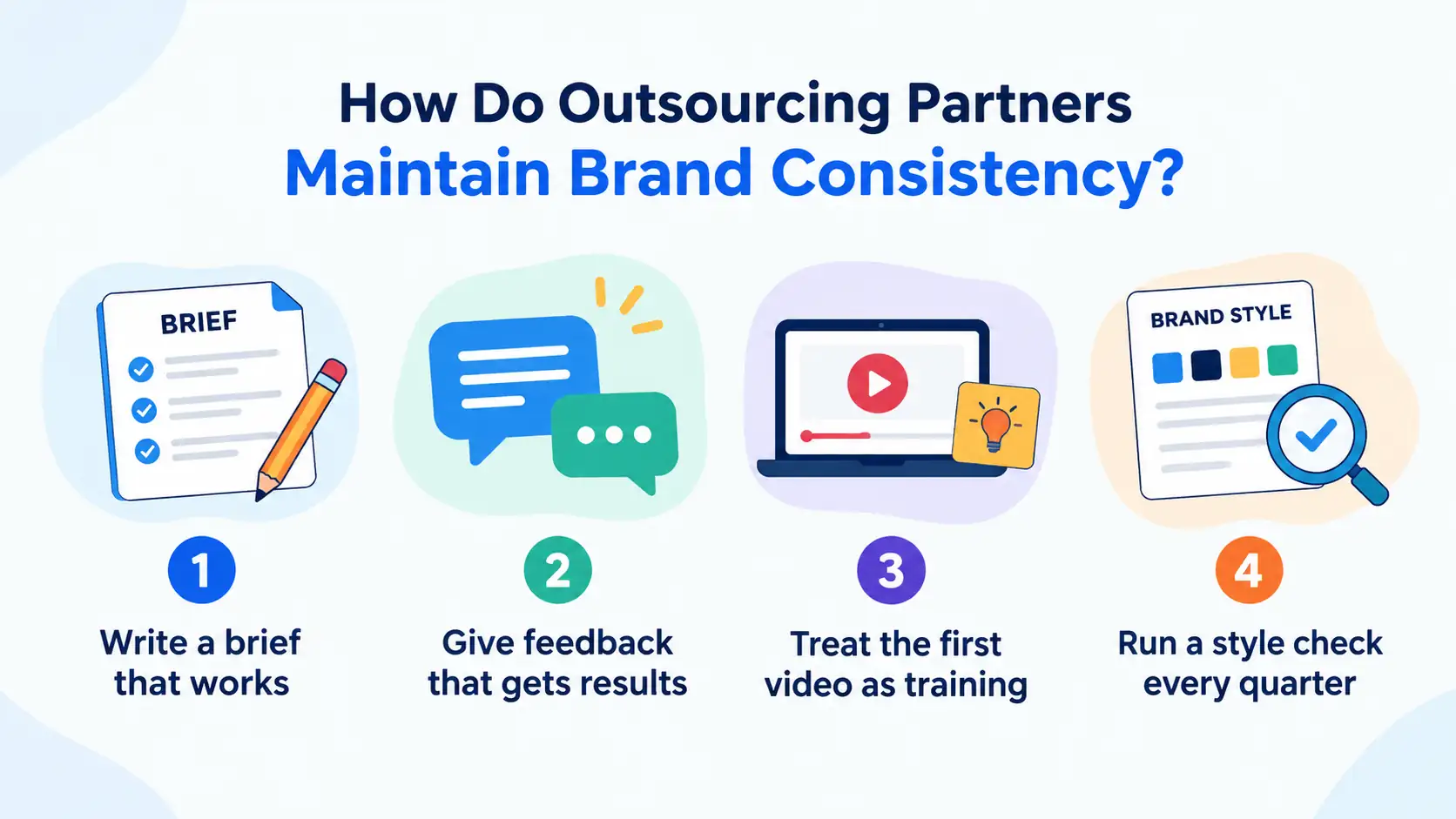
1. Write a brief that works
Use this for every video. It takes five minutes.
Video title / topic:
Goal of this video (watch time, sign-ups, sales):
Hook (how it should open):
Tone (e.g. funny, calm, urgent):
Length target:
Must-keep moments:
Must-cut moments:
Call to action:
Reference clip (optional):
Deadline:
2. Give feedback that gets results
- Use timestamps: “0:42, cut the pause before the joke.”
- Batch your notes: send them all at once, not as a drip.
- Say why, not just what: “too slow” teaches less than “viewers leave when it drags here.”
- Show examples: point to a reference clip when you can.
3. Treat the first video as training
Expect to give more notes on video one. Record a quick screen-share review and keep a running list of “lessons learned.” By video three, most of those notes should disappear.
4. Run a style check every quarter
Every three months, compare your newest videos with your guide. If your style has moved on, update the guide, so your editor is following the current you, not last year's.
Tools and techniques professional editors use
- Software: Premiere Pro, DaVinci Resolve, After Effects and Final Cut Pro
- Workflow tools: Frame.io for timestamped review, Drive or Dropbox for files, Notion or Trello for tracking
- AI tools: handy for captions, silence removal and rough cuts. Let them save time on the mechanical parts, then let a human decide how it feels.
Techniques that matter on YouTube:
- Cutting pre-intro padding, such as logo animations and long welcome-backs, from the first 15 seconds.
- Replacing filler B-roll that has no narration or on-screen text with visuals that carry the point.
- Colour grading for a consistent look and sound design so your voice stays clear over music.
- Caption styling that matches your brand rather than a default template.
Can outsourcing add creativity beyond basic editing?
It often does, because a second pair of eyes sees what you can't. A good editor can:
- Restructure a rambling video so the best moment comes first
- Suggest hooks you wouldn't have thought of
- Add motion graphics that explain an idea faster than words
- Cut a long video into Shorts, Reels and clips for other platforms
- Spot where your retention graph dips and suggest a fix
To get this, share results with them. Send your retention data and tell them which videos did well. Editors who know what worked can start making creative suggestions and that's when they become a partner instead of a vendor.
How secure is outsourced video editing?
Your footage is valuable, so check these before you share a single file:
- NDA signed before any raw footage moves
- Access controls: share folders only with the people working on your project and remove access when the job ends
- Secure transfer: use a private cloud link, not email attachments or public links
- Watermarked drafts for review copies
- Ownership clause: you own the footage and the final edit
- Backups: keep your originals and ask where the editor stores working files and for how long
Which industries benefit most from outsourced video editing?
- YouTubers and creators: a steady upload schedule without burnout
- Coaches and course creators: polished lessons and promo clips
- E-commerce and D2C brands: product videos and ad cuts
- Real estate: property tours and listing reels
- SaaS: demos, explainers and onboarding videos
- Agencies: extra capacity for client work
- Podcasters: video versions and short clips of each episode
Common mistakes to avoid
- Hiring on price alone. The cheapest edit usually costs you in reshoots and rework.
- Skipping the test edit. You find out the editor isn't right after paying for ten videos.
- Vague notes. “Make it pop” leaves your editor guessing and guessing leads to more revisions.
- No style guide. You end up repeating the same notes on every video.
- Micromanaging or disappearing. Hovering over every cut slows everything down. Never replying leaves your editor without direction.
- Treating your editor as a vendor. The ones who care most are the ones who feel part of the channel.
Conclusion
Outsourcing doesn't cost you your style when you do four things: write your style down, pick a partner who has proven they can match it, brief every video clearly and give specific feedback. After a few videos, most of the work is done.
Start today by writing your one-page style guide and collecting five reference videos. Once those exist, finding the right video editing service for YouTube creators gets much easier.
If you'd like a team to take the editing off your plate, take a look at Sociyell's video editing and post-production service, or get in touch and send over a clip.
Frequently asked questions
Is outsourcing video editing worth it?
Yes, if editing costs you more in time than an editor would cost in money, or if it's the reason you skip uploads. Use the hours-versus-fee maths from earlier with your own numbers.
How much does it cost to outsource video editing?
Most of the spread comes from complexity, not skill. A simple talking-head edit and a graphics-heavy story edit are different jobs. Ask for a quote on one real video.
Should I hire a freelancer or an agency?
Ask yourself this: would you be stuck if your one editor took a week off? If yes, choose an agency. If you only have a single channel and you're happy to manage one person, a freelancer is fine.
How do I make sure an editor matches my style?
Run a paid test edit on your own footage, then judge it on three things: pacing, captions and tone. If it passes, give notes and see how they respond.
Who owns the final edit?
You should and it should be in the contract. Confirm it before the first payment, including whether you get the project files.
Can AI replace a video editor?
Not for the parts that make you you. AI is useful for captions, silence removal and rough cuts. It can't tell whether a joke lands or a cut feels like your voice.