Turn photos into social media content: How AI makes it possible
Learn how to turn photos into social media content with AI. See Sociyell's gallery-to-post workflow, real examples and simple tips to get started.
You already have plenty of good photos on your phone, from product pictures to customer moments and daily work. But posting them on social media takes time. You have to think of a caption, make the design, and adjust the size for each platform. Finding time to create daily posts or hiring a designer every time isn't always practical. With AI tools, you can turn your photos into ready-to-share social media content in just a few minutes.
This guide explains how the technology works, what a single photo can become and a simple step-by-step process you can copy today, even if you have never used an AI tool before. Then we'll help you pick the fastest, most affordable way to get it done: DIY tools, a done-for-you service, or a freelancer.
What does “turning photos into social media content” actually mean?
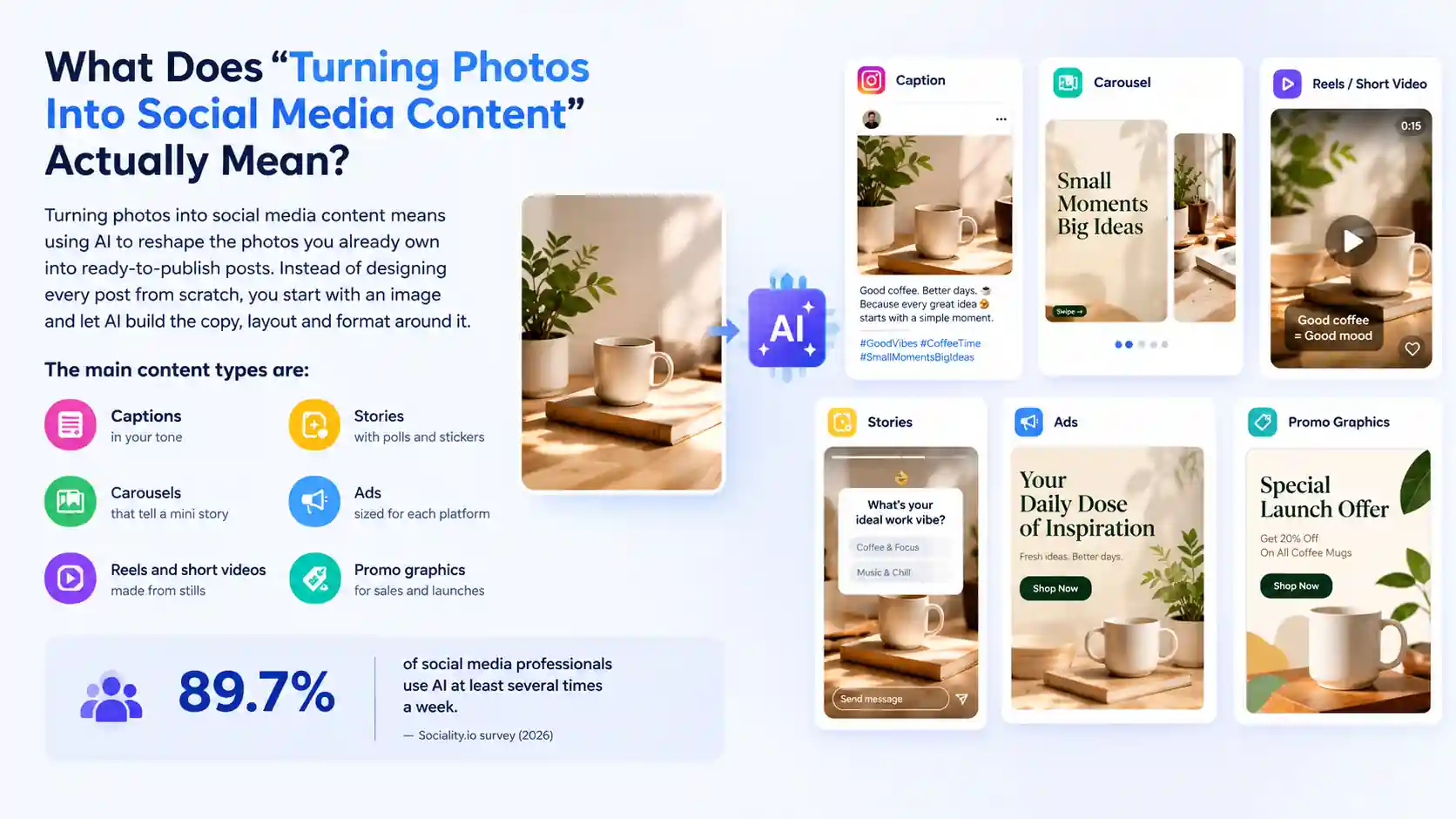
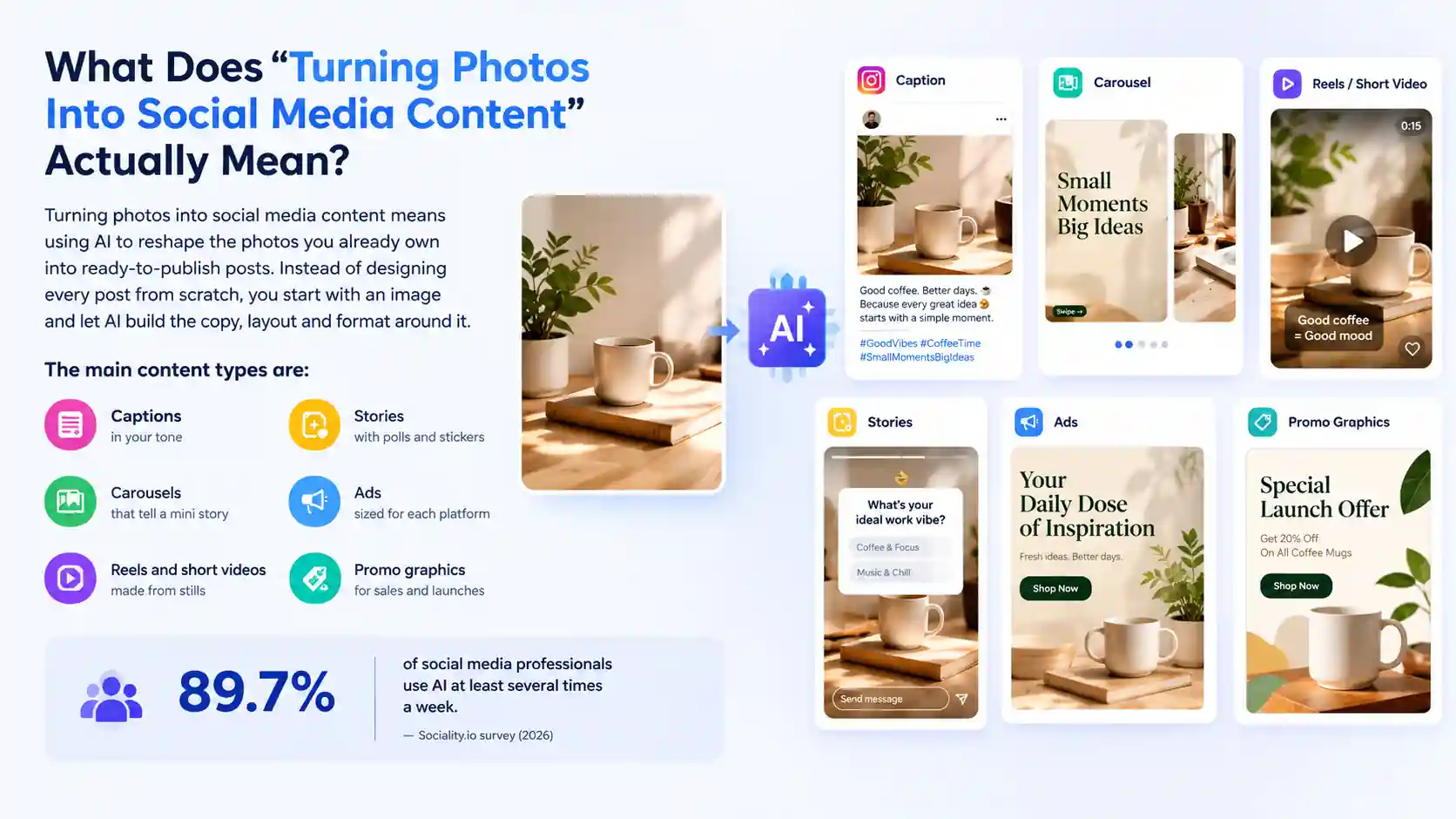
Turning photos into social media content means using AI to reshape the photos you already own into ready-to-publish posts. Instead of designing every post from scratch, you start with an image and let AI build the copy, layout and format around it.
The main content types are:
- Captions in your tone
- Carousels that tell a mini story
- Reels and short videos made from stills
- Stories with polls and stickers
- Ads sized for each platform
- Promo graphics for sales and launches
This is already mainstream. A 2026 Sociality.io survey found that 89.7% of social media professionals use AI at least several times a week.
How AI turns a photo into content: The technology behind it
An AI photo to content tool combines four technologies working together.
1. Computer vision
This is how AI “sees.” It identifies the subject, colours, lighting, mood and composition, so it knows what the picture is about.
2. Natural language generation
Once the AI understands the image, it writes captions, hooks, hashtags and alt text based on what the photo shows and what the post should achieve.
3. Generative image and video models
These models build new things from your original: fresh backgrounds, lifestyle scenes, layouts and motion. You can turn a simple product photo into a short Reel without having to shoot a new video.
4. Brand voice learning
Generic tools give generic results, which is why so many AI posts look alike. When the AI learns your colours, tone and style, it can transform photos into branded content that looks like one brand made it. Even the best AI photo to content tool needs a person steering it: AI supplies the speed and a creative director supplies the taste.
What can AI create from a single photo? (With examples)
When you transform photos into branded content, one image can become:
- Captions and hooks: several options in different tones
- Hashtags: relevant, mixed-reach sets
- Carousels: hook, value slides and a call to action
- Photo-to-video: motion, zooms and animated backgrounds
- Stories: polls and questions
- Quote graphics: a punchy line over the photo
- Alt text: descriptions for screen readers
Before and after: One photo, five content pieces
Illustrative example. Before: one phone photo of a latte on a café counter.
After:
- Branded post: the photo in the café's colours with the caption “Monday needs this.”
- Carousel: “Three ways to order our latte.”
- Reel: a five-second slow zoom with steam motion and soft music.
- Story: a poll asking “Hot or iced?”
- Quote graphic: “Coffee first, everything else second,” placed over the same photo.
Add hashtags and alt text and one photo covers a week.
Step-by-step: How to turn your photos into social media posts with AI
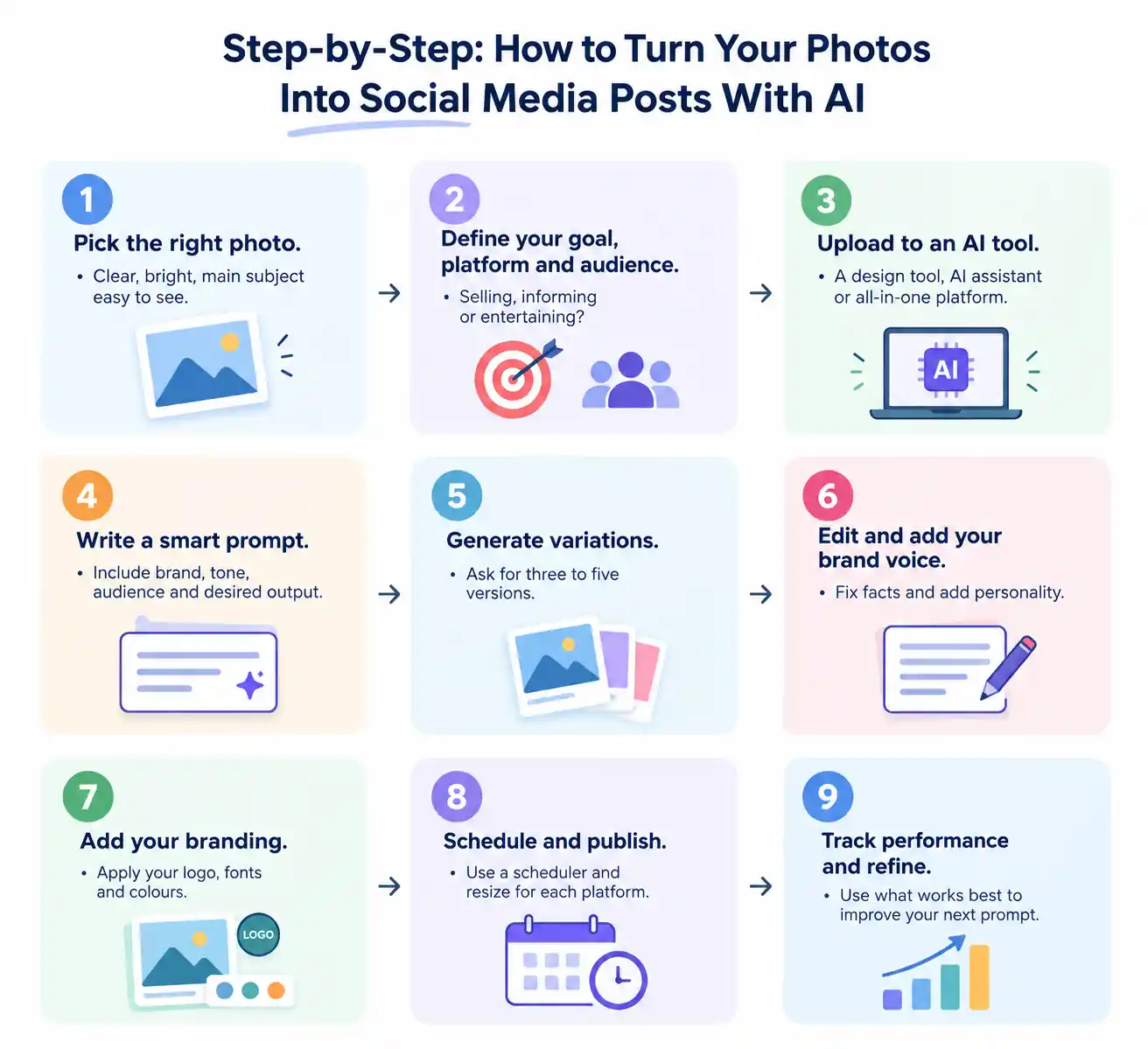
- Pick the right photo. Start with a clear, bright photo where the main subject is easy to see.
- Define your goal, platform and audience. Selling, informing or entertaining?
- Upload to an AI tool. A design tool, AI assistant or all-in-one platform.
- Write a smart prompt. Include brand, tone, audience and desired output (see below).
- Generate variations. Ask for three to five versions.
- Edit and add your brand voice. Fix facts and add personality.
- Add your branding. Apply your logo, fonts and colours.
- Schedule and publish. Use a scheduler and resize for each platform.
- Track performance and refine. Use what works best to improve your next prompt.
Three copy-paste prompts
1. Caption prompt: “You are a social media copywriter for [brand], a [type of business]. Write 3 Instagram captions for this photo of [describe]. Tone: [friendly/premium]. Include a hook line, one call to action and 5 hashtags.”
2. Carousel prompt: “Create a 5-slide carousel using this product photo, keeping the target audience in mind: [audience]. Slide 1: a hook. Slides 2 to 4: benefits. Slide 5: call to action. Keep each slide under 12 words.”
3. Reel prompt: “Create a 7-second Reel concept from this photo: describe the motion, on-screen text and a caption. Brand style: [colours, mood].”
Done for you: Sociyell's gallery-to-post workflow
If you'd rather skip the tools, this is how we turn photos into social media content for brands at Sociyell:
- Gallery: you send photos, clips and rough scraps. No full brief needed.
- Brand calibration: we train our AI around your colours, tone, style and visual language.
- AI production: with a creative direction set, AI generates images and video from your assets.
- Finishing: revisions, versioning and format changes for each platform.
- Finished posts: first assets typically arrive within 48 to 72 hours of briefing.
Real examples: Aurece (a foundation-stick flat lay), Crave Burger Co. (burger, cup and bag with flame graphics) and Aura Botanicals (face cream and lotion on stone).
Want us to do this for you? Talk to Sociyell.
DIY AI tools vs. done-for-you services vs. freelancers: Which is right for you?
| Basis | DIY AI tools | Done-for-you service | Freelancer |
|---|---|---|---|
| Cost | Free to about $10-$20/month per tool | Design subscriptions run roughly $499-$2,599/month | About $5-$20 per simple post, $25-$150 for experienced designers |
| Speed | Minutes to hours | Often 1 to 3 days | Days, depending on availability |
| Quality control | You control it, but results depend on your skill | Consistent, managed process | Depends on the person |
| Effort required | High: you prompt, edit and publish | Low | Medium: briefing and feedback |
| Best for | Tight budgets, simple posts | Steady volume and brand consistency | Custom or niche projects |
Prices are approximate, based on ManyPixels' 2026 pricing guides.
Quick decision guide
- Choose AI tools if you have a small budget and need simple posts fast.
- Choose a service if you want steady, on-brand output without managing the process.
- Choose a freelancer if you want a unique design, need someone with specific expertise, or have a project that needs a personal touch.
Can you recommend a service that turns photos into engaging content quickly?
If you want speed without doing the work, a managed AI-plus-human service is the safest option. Sociyell, for example, typically delivers first assets within 48 to 72 hours of briefing. DIY tools can produce a post the same day.
Best AI tools to turn photos into social media content
The right AI photo to content tool depends on the job. Here are popular options.
| Category | Tool | Best for | Key features | Free plan | Pricing |
|---|---|---|---|---|---|
| Captions | AI assistants (ChatGPT, Claude, Gemini) | Captions and hooks | Drafts copy from a photo | Yes (limited) | Paid plans vary |
| Design | Canva | All-round post design | Templates, Brand Kit, resizing | Yes | Pro about $15-$18/month |
| Design | Photoroom | Product photos | Background removal, AI backgrounds | Yes (250 exports/month) | Pro about $12.99/month |
| Photo-to-video | CapCut | Short-form video | Templates, effects, captions | Yes | Standard about $9.99, Pro about $19.99/month |
| Photo-to-video | Runway | Animating images | Motion and background tools | Limited credits | Paid plans vary |
| All-in-one | Predis.ai | Full posts from one idea | Images, videos, captions | Yes (about 15 posts, watermark) | Paid plans vary |
| All-in-one | Buffer (AI Assistant) | Scheduling plus copy | Publishing and AI writing | Yes (limited) | Paid plans vary |
Prices change often and differ by region and billing term. Confirm on each provider's pricing page.
How to choose
- Does it keep your brand colours, fonts and tone?
- Does it export the right sizes for each platform?
- Does the free plan add watermarks or limit commercial use? (Predis's free tier, for example, adds a watermark and has no commercial rights.)
- How easy is it to edit the output?
- Can you schedule posts from the same place?
Best services to turn photos into social media posts for small businesses
The best service depends on what you value most: speed, price or consistency.
What small businesses should look for
- Turnaround time: how soon do you get the first posts?
- Brand consistency: will every post look like you?
- Revisions: how many rounds are included?
- Platform formats: are posts sized for each channel?
- Pricing model: per post, monthly subscription or custom quote.
Types of services
- Subscription design services: a monthly fee for design requests.
- Social media management agencies: strategy, content and posting, like Sociyell's social media growth and management service.
- AI-plus-human hybrid services: AI produces at speed while people direct and polish. This is where we transform photos into branded content at Sociyell.
| Option | Price range | Turnaround | Best use case |
|---|---|---|---|
| AI-plus-human hybrid studio (e.g., Sociyell) | Custom quote | First assets in 48-72 hours | Turning a photo library into steady, on-brand content |
| Subscription design service | About $499-$2,599/month | Varies, usually days | Ongoing graphic design needs |
| Social media management agency | About $100-$300/hour | Ongoing | Strategy plus full management |
| Experienced freelancer | About $25-$150 per post | Days | Custom, niche posts |
| Marketplace freelancer | About $5-$20 per post | Varies | Simple edits and templates |
| DIY AI tools | Free to about $20/month per tool | Minutes | Fast, simple posts |
Our picks (Sociyell is our own service, so weigh that accordingly):
- Best overall: an AI-plus-human hybrid service, for consistency and low effort.
- Best budget: DIY AI tools on free or low-cost plans.
- Best for speed: DIY tools for same-day posts, or a hybrid service when you want speed without the work.
Where to hire a freelancer to transform photos into professional social media posts
1. Best freelance marketplaces
- Upwork: the largest pool of designers globally, with quality that varies.
- Fiverr: best for small, quick projects such as social media templates.
- Freelancer.com and PeoplePerHour: broad pools for comparing quotes.
- Contra: portfolio-first, for independent creatives.
2. Niche and local options
Try social media communities and Facebook groups, search LinkedIn for “social media content designer,” browse Behance and Dribbble and ask local business owners for referrals.
3. Typical freelancer rates
- Per post: about $5-$20 on marketplaces, $25-$150 for experienced designers.
- Per package: about $50-$500 for a set of 5 to 10 posts.
- Monthly retainer: design packages commonly fall around $300-$1,500.
4. How to vet a freelancer
Check their portfolio for your style, look for niche experience, run a small paid sample test and judge their communication.
5. What to include in your brief
Original photos, brand guide, platform and sizes, tone, example posts, deadline, revisions and usage rights.
6. Red flags to avoid
No original work in the portfolio, prices far below market, refusal of a paid test, full payment demanded upfront, vague usage rights and slow communication.
Affordable ways to convert product photos into promotional posts for online stores
1. Free and low-cost AI tools for product photos
Photoroom's free plan handles background removal and quick edits, Canva's covers templates and CapCut's covers short videos. Use an AI assistant for captions.
2. Template-based design platforms
Canva, Adobe Express and VistaCreate offer ready-made layouts. Swap in your photo and resize for each platform.
3. Budget freelancers and bulk packages
Ask for a bulk package of 5 to 10 posts, which usually costs less per post.
4. Product post ideas
- Launch: “Meet the new [product].”
- Discount: a bold price graphic.
- Bundle: products together with the savings.
- Testimonial: a customer quote beside the product.
- Lifestyle shot: the product in real use.
| Monthly budget | What you can do |
|---|---|
| $0 | Free plans of Canva, Photoroom and CapCut plus an AI assistant (expect limits) |
| Under $50 | One paid design tool and one video tool (e.g., Photoroom Pro plus CapCut Standard) |
| $100-$300 | A small freelancer package or a starter batch from a managed service |
How to get high-quality social media posts quickly (fast-turnaround options)
- Same-day services: many freelancers offer rush delivery for a fee.
- Managed services: first assets in 48 to 72 hours with a hybrid studio.
- AI-first workflows: let AI draft captions, layouts and clips, then review.
- Templates: build five reusable templates and swap photos in.
- Batch content days: create a week of posts in one sitting.
A 60-minute workflow for one week of posts
- 0-10 min: choose seven photos.
- 10-20 min: set your goal, brand kit and posting days.
- 20-35 min: run one caption prompt with three options per photo.
- 35-50 min: add your photos to ready-made templates and create one or two short videos.
- 50-60 min: edit captions and schedule.
Platform-by-platform guide
| Platform | Image size | Tone | AI tip |
|---|---|---|---|
| 1080x1350 (4:5) feed, 1080x1920 Stories and Reels | Visual and warm | Ask for three hooks, keep the best | |
| 1080x1350 or 1200x630 for links | Friendly and conversational | Rewrite a caption as a question | |
| 1200x1200 or 1200x627 | Professional and insight-led | Turn a work photo into a short lesson | |
| 1000x1500 (2:3) | Helpful and keyword-rich | Ask for keyword-rich pin titles | |
| TikTok and YouTube Shorts | 1080x1920 (9:16) | Casual and fast | Animate a still into a 7-second clip |
| X (Twitter) | 1600x900 (16:9) | Short and punchy | Request five short options |
Platforms update specs from time to time, so check each platform's help page.
Who benefits most? (Use cases)
- Small businesses: steady posting without a design team.
- E-commerce stores: product photos become promos and ads.
- Real estate: turn property photos into attractive “Just Listed” posts to showcase new properties.
- Restaurants: dish photos become menu features.
- Creators: one shoot stretched across weeks.
- Agencies: faster delivery across many accounts.
Benefits of using AI to repurpose photos
- Time savings: Sociality.io reports that AI now helps create around half of all social media content, making content creation faster and easier.
- Consistent posting: a photo library keeps your calendar full.
- Lower costs: no studio or shoot day for every campaign.
- Scale: one photo, many formats. Sociyell's AI Gen service can scale visual output by up to 10x.
- Creative variety: test more ideas and find what works faster.
Common mistakes and limitations
- Generic captions: vague prompts produce vague posts.
- Skipping human review: 78.4% of marketers edit AI output moderately or heavily before publishing, per the same Sociality.io survey.
- Copyright and privacy: use your own photos and always ask for permission before sharing pictures of other people.
- Over-editing: heavy effects erase authenticity.
- AI disclosure rules: major platforms have labelling rules for AI content, so check them first.
Mistakes when hiring: unclear briefs, paying everything upfront and no written agreement on usage rights.
Pro tips to make your content perform better
- Feed the AI context: audience, goal and offer.
- Keep a brand voice guide: tone words and phrases to avoid.
- Test multiple hooks: change only the first line.
- Add a human touch: a personal story or behind-the-scenes detail.
- Use analytics: feed your best posts back into your prompts.
The future of AI photo-to-content
The gap between “photo” and “published” will keep shrinking. In the future, photos may come with built-in animations, AI tools will be better at matching a brand's style, and users will be able to plan and schedule posts directly from their galleries with just a few simple approvals.
But authenticity will matter more. In HubSpot's 2026 survey, 62.7% of marketers said more unique, human-centred content is needed to compete with AI-generated content. Winning brands will pair AI speed with real stories and a recognisable voice.
Conclusion
Your gallery is a content bank you haven't touched yet. Now you know how to turn photos into social media content: understand the technology, follow the nine steps and choose the route that fits your budget, whether DIY tools, a service or a freelancer.
If you want your photos transformed without the hassle, explore our AI Gen production service or get in touch and send us a few images to start.
Frequently asked questions
What is the best service to turn photos into social media posts for small businesses?
It depends on your priorities. For steady, on-brand output with little effort, an AI-plus-human service like Sociyell fits well. For tight budgets, use DIY tools. For custom one-offs, hire a freelancer.
Where can I hire a freelancer to turn photos into professional posts?
You can find freelancers on platforms like Upwork, Fiverr, Freelancer.com, PeoplePerHour and Contra. You can also explore LinkedIn, Behance and Dribbble to find people whose work matches your needs. Review portfolios and run a small paid test first.
Where to hire freelancers who specialize in turning photos into social media content?
Search niche phrases like “product photo to Instagram carousel,” filter portfolios by your industry and ask for a paid sample before committing.
How can I make attractive product promo posts on a tight budget?
Start with free plans from Canva, Photoroom and CapCut, use templates and ask freelancers for bulk packages.
Can you recommend a service that turns photos into engaging content quickly?
A managed hybrid service is the easiest route: Sociyell typically delivers first assets within 48 to 72 hours of briefing. DIY tools can produce a post the same day.
How quickly can photos be turned into social media content?
With AI tools, minutes per post. With freelancers, usually days. With a managed AI-plus-human service, around 48 to 72 hours for first assets.
How much does it cost to hire someone for social media posts?
Marketplace freelancers often charge about $5-$20 for simple posts and experienced designers $25-$150. Packages of 5 to 10 posts run about $50-$500 and design subscriptions roughly $499-$2,599 a month.
Is AI or a freelancer better for small businesses?
Neither wins every time. AI helps you create content quickly and in less time, while a freelancer adds a personal touch and creative ideas. Many small businesses use AI for regular social media posts and hire freelancers for special campaigns.
Can AI turn a photo into a video?
Yes. Tools such as CapCut, Runway and Lumen5 can add motion, zooms and animated backgrounds to a still. Review the result before posting.
Is it legal to use AI on photos of people?
Often yes, but it depends on consent and where you are. Get permission (ideally a written release) before using someone's image commercially, avoid misleading edits and follow platform labelling rules. This is just a general guide to help you out, not a substitute for advice from a legal professional.