
AI content creation for coaches: A practical guide to scaling your content
Go from ‘no time to post’ to 30 posts a month. Learn AI content creation for coaches with a simple framework, prompts and tools.
Why coaches are burning out on content
You spend all day coaching and by 9:40 pm, you remember you still need to post on social media.
You know what you want to share, but turning every idea into a post, caption or video takes time you simply don't have.
Take Maya, for example. She's an illustrative example of a coach facing this exact challenge. She has plenty of expertise to share, but creating content consistently feels like another full-time job.
This guide shows how AI content creation for coaches can help turn existing ideas into 30 posts a month, using a repeatable workflow that aims to take about two hours a week.
What you'll learn:
- What AI can help with and where you still need to step in
- A simple framework that turns one idea into 10 pieces
- Prompts, tools and a weekly workflow you can copy
- How to decide whether to do it yourself or get help
- A realistic path to $10,000 a month
What is AI content for coaches?
AI content creation for coaches is using AI tools to turn your own expertise, like session insights, voice notes and client wins, into posts, emails, videos and graphics faster than you could by hand. You bring the ideas and judgment. AI handles drafting, repurposing and scheduling.
What AI can do: ideation, drafting, repurposing one idea into many formats and scheduling.
What AI can't do: live your stories, deliver your client results, or earn client trust. Those stay yours. This is true of AI content for personal brands in general, because people follow a person, not a template.
Creating vs. scaling. Creating means writing a one-off post from scratch every time. Scaling means building a repeatable content engine where a single idea feeds a whole month. Most coaches are stuck in creating. The rest of this guide moves you into scaling.
What exactly is an AI-powered coaching business?
It's a coaching business where AI supports the work around your coaching, so you have more time for the coaching itself. It doesn't take your place. Instead, it helps you manage your coaching business without having to handle every little task yourself.
AI helps in three layers:
- Marketing: content, emails, lead magnets
- Delivery: session prep, summaries, worksheets, client resources
- Operations: scheduling, onboarding, follow-ups
The personal connection with clients, your understanding of their needs and the guidance you give will always come from you. Clients value your support and understanding, not just how quickly you work.
| Basis | Traditional coach | AI-powered coach |
|---|---|---|
| Time spent | Many hours on content, often late at night | A few focused hours a week |
| Output | A few posts when time allows | A steady monthly calendar |
| Scalability | Limited by your own hours | Content keeps working while you coach |
Why coaches should use AI now
- The time cost is real. One post means an idea, a draft, a design, an edit and a publish. Posting five times a week by hand easily takes 8 to 10 hours, by our estimate. That's a whole day you could spend working with your clients instead.
- Consistency wins. This is especially true for AI content for personal brands, where your audience can't trust you if they only see you twice a month. Posting regularly helps people remember you even when they're not attending your sessions.
- Content is a path to discovery calls. People rarely book a stranger. They follow you for a few weeks, read your posts and then book. Good content does the warming-up for you.
- The numbers back it up. HubSpot's AI Trends for Marketers report found that marketers who use AI save about 6.1 hours a week and around 3 hours per piece of content. And it's no longer a fringe habit: the 2026 CMO Survey found that 73.9% of companies use AI for content creation, up from 49.2% in fall 2023.
The question is no longer whether to try AI content creation for coaches. It's whether you'll do it with a system.
Coaches already building AI-powered businesses
Here are four examples of how it works. Each shows what was automated, what stayed human and what changed.
1. The solo life coach (illustrative)
- Automated: caption drafts and scheduling.
- Stayed human: her stories and client wins.
- Before → after: one post every two weeks → a full 30-post calendar from one voice note a week.
- Result: steady visibility and more discovery-call requests coming from content.
2. The business coach with a small team (illustrative)
- Automated: first drafts, formatting and scheduling, with an assistant editing.
- Stayed human: sales calls and final approval.
- Before → after: staying up late to write posts and posting only once in a while → recording one voice note each week and letting an assistant plan and schedule the posts.
- Result: a pipeline that no longer depends only on referrals.
3. The niche fitness coach (illustrative)
- Automated: turning existing workout videos, gym photos and client transformation content into a consistent social presence.
- Stayed human: the coaching itself and the real client results behind the content.
- Before → after: about 800 → over 14,000 TikTok followers in three months.
- Result: 22 new online coaching clients attributed to social.
4. The course creator (illustrative)
- Automated: clipping, captioning and reformatting one webinar into carousels, emails and a blog post.
- Stayed human: the teaching and the live Q&A.
- Before → after: a webinar seen once → a month of content from the same recording.
- Result: more signups from material that already existed.
All four follow the same approach. They automate the repetitive work and keep the personal part. Many also bring in a content creation agency for coaches to keep the engine running.
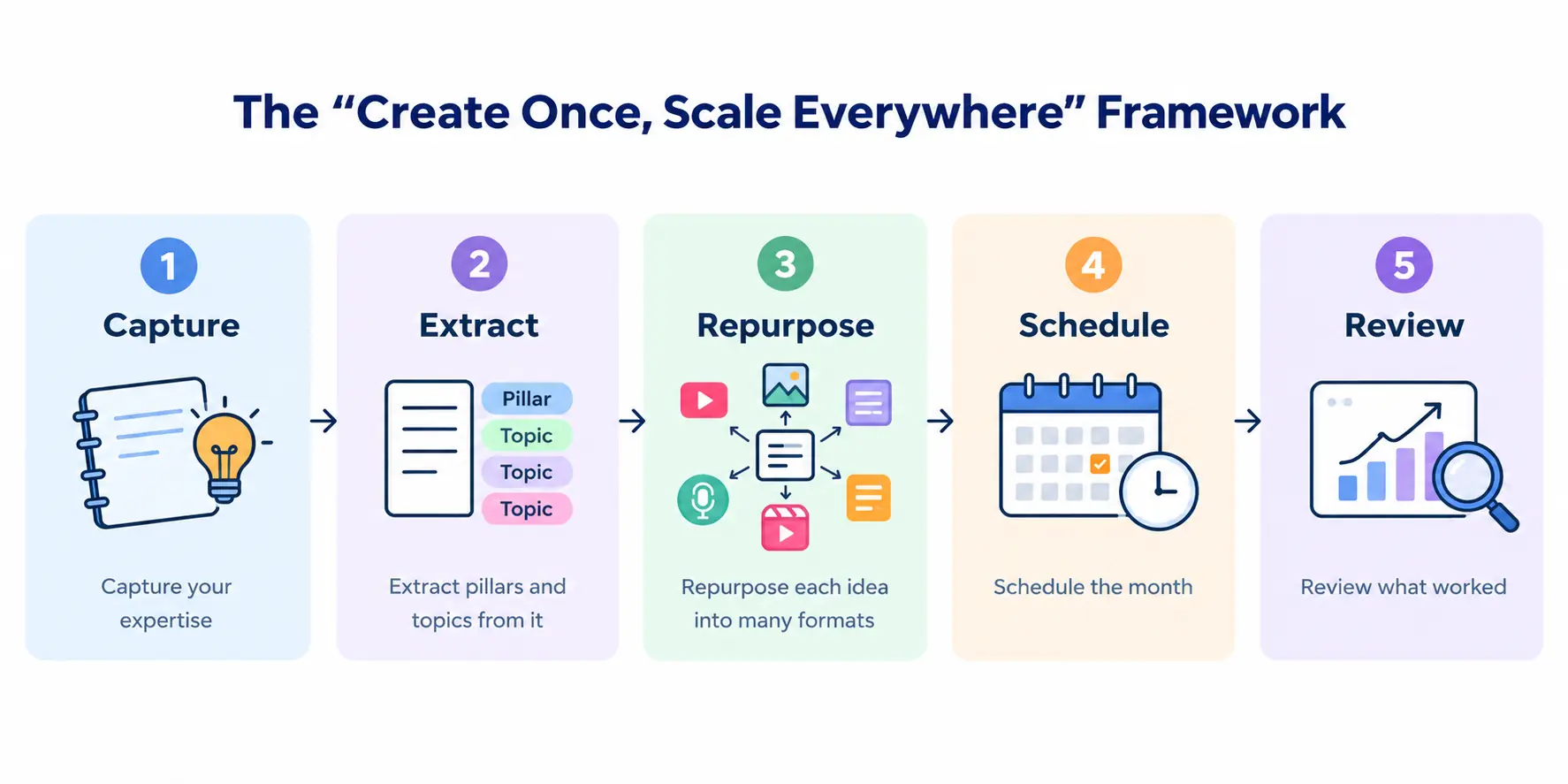
The “create once, scale everywhere” framework
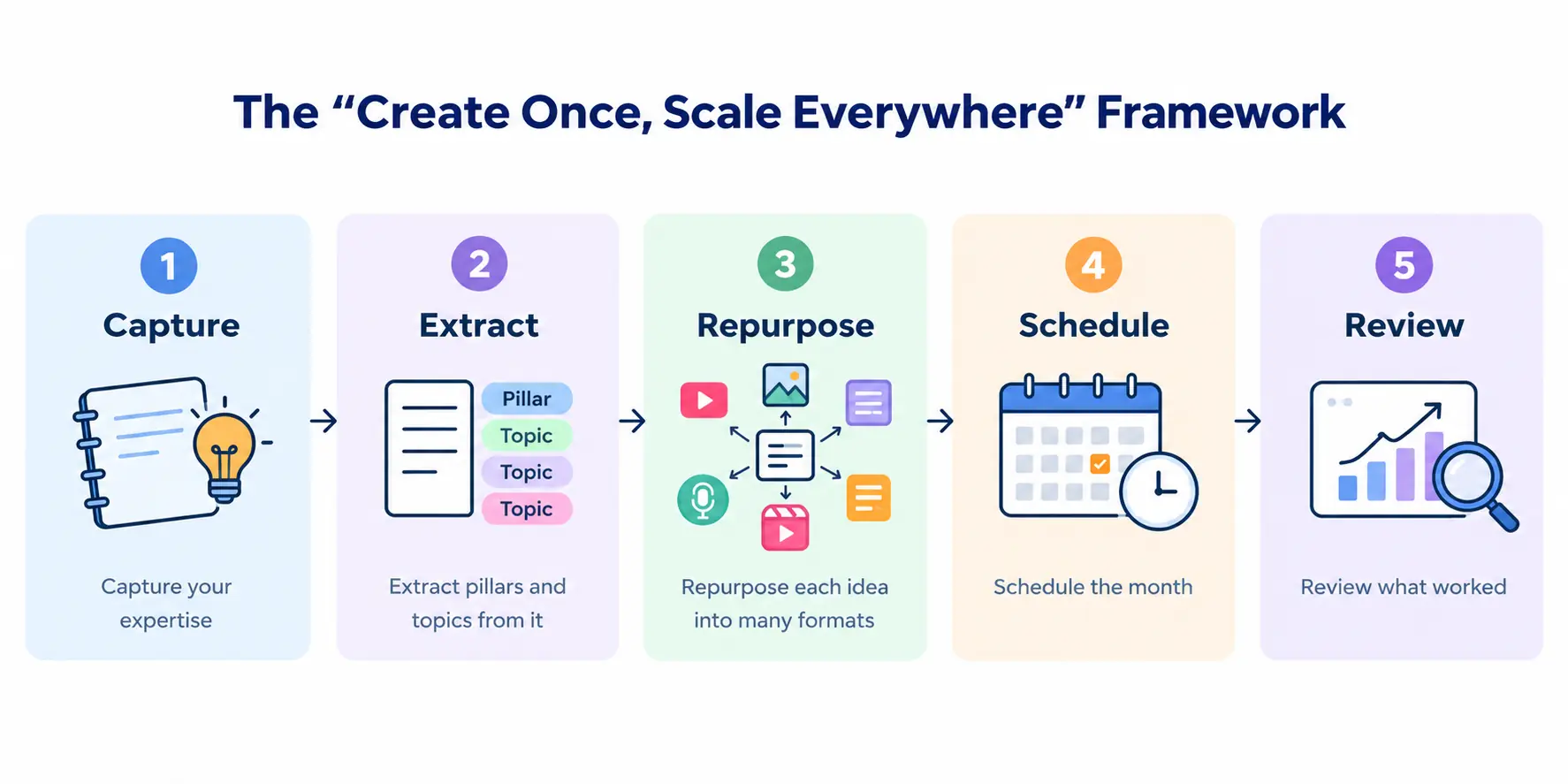
We call it the 1-to-10 Content System, where one idea is turned into ten different pieces of content. It's the simplest way to run AI content for personal brands without living on your phone.
Capture → Extract → Repurpose → Schedule → Review
- Capture your expertise
- Extract pillars and topics from it
- Repurpose each idea into many formats
- Schedule the month
- Review what worked
The next three sections cover Capture, Extract and Repurpose. Scheduling and review come later, in the workflow and measurement sections.
Step 1: Capture your expertise
AI content creation for coaches only works if the input is yours, because AI can't invent what you know. Your raw material is already all around you:
- Voice notes you record on a walk
- Sessions (with client consent and anonymized)
- FAQs: the questions clients ask again and again
- Webinars and workshops
- Podcasts you've been on or recorded
- Client wins (with their permission)
Turning rambling transcripts into usable material. Don't type. Talk. Maya records a 10-minute voice note each week about one lesson she keeps repeating. She pastes the transcript into an AI tool and asks it to pull out the main idea, three supporting points and one story. Rambling is fine, because AI is good at finding the signal in a messy transcript.
Why your ideas must be the input. Generic input gives generic output and that's the main reason most AI content flops. Your stories and opinions are what make yours different.
You can also use your website FAQs, service pages, past social media posts, emails and customer feedback as sources for new content ideas. These materials help AI understand your services, audience questions and the topics you have already covered, so you don't have to start from scratch every time.
Step 2: Build your content pillars and topic bank
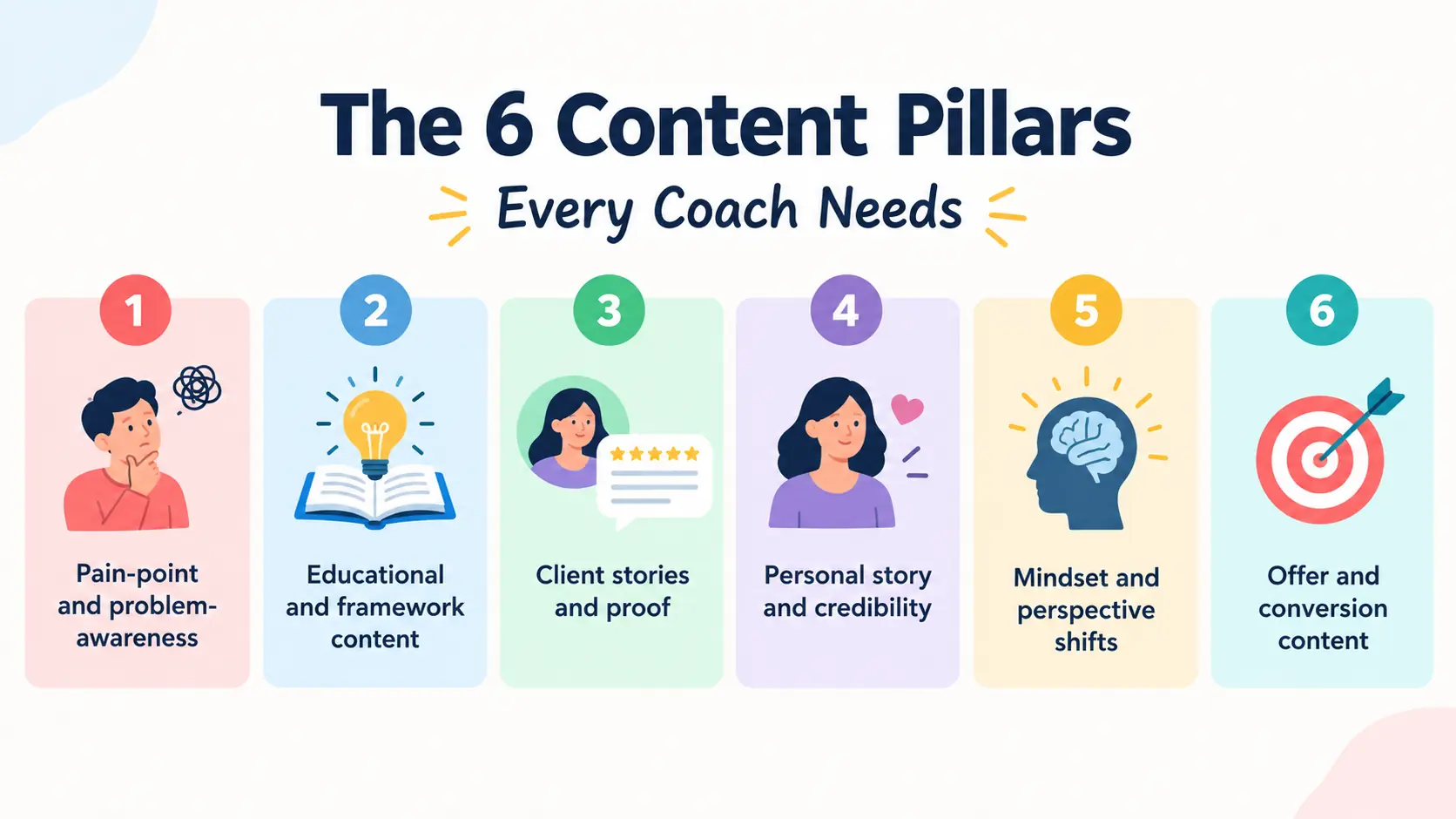
Pick 3 to 5 pillars, the themes you want to be known for. For most coaches these are:
- Education: what people need to understand
- Stories: your journey and client journeys
- Myths: what people get wrong in your niche
- How-tos: practical, step-by-step help
- Results: wins and transformations
Prompts to generate 30 days of topics:
- “I'm a [type] coach helping [audience] with [problem]. Give me 30 post topics across these pillars: [list]. For each, tell me what the reader should feel or do next.”
- “Take these 30 topics and arrange them into a 4-week calendar, mixing the pillars so no two similar posts sit next to each other.”
Map topics to the client journey. Education and myths build awareness. Stories and how-tos build trust. Results, with a clear invitation, drive booking. A healthy month has all three.
Average AI prompts vs. expert prompts: What actually changes?
Almost anyone can ask ChatGPT to write an Instagram post. The challenge is getting something specific enough to reflect your brand, address a real audience problem and give people a reason to engage.
The difference often comes down to the instructions and information you provide.
Let's see how two prompts perform for the same business: a life coach helping working professionals manage stress and improve work-life balance.
1. The average prompt: What most people try
“Give me five Instagram post ideas about work-life balance for a life coach.”
What the AI might generate:
| Post idea | Suggested angle |
|---|---|
| 1. Set boundaries | Learn to say no and protect your personal time. |
| 2. Manage your time | Use a daily schedule to balance work and life. |
| 3. Practice self-care | Make time for exercise, hobbies and relaxation. |
| 4. Avoid burnout | Recognise stress and take regular breaks. |
| 5. Stay positive | Maintain a positive mindset when work gets busy. |
These ideas are relevant, but they are also predictable. Thousands of coaches could publish the same advice.
The prompt doesn't tell AI who the coach helps, what those people struggle with, how the coach approaches the problem or what makes the brand different.
The result: a reasonable starting point, but little that makes the content distinctive.
2. The expert prompt: Give AI the right context
Now, let's use a more structured approach.
Instead of asking AI to generate ideas from scratch, give it a clear role, audience, business context, brand voice, research inputs and content requirements.
“You are a senior content strategist specialising in personal brands and life coaching businesses.
Business: I am a life coach helping working professionals manage stress, establish healthier boundaries and build a more sustainable relationship with work.
Target audience: Professionals aged 28–40 who regularly work late, feel guilty when taking breaks and struggle to switch off after work.
Brand voice: Warm, practical, empathetic and direct. Avoid corporate jargon, exaggerated promises and generic motivational language.
Reference material: Use my website's service page, FAQs, brand guide and three examples of my previous posts. Also review the supplied competitor posts and public customer reviews. Use only the provided research, distinguish observed findings from assumptions, and flag any claims that need verification.
Task: Create five Instagram post concepts that address specific problems this audience experiences.
For each concept, provide:
- A relatable opening hook.
- The specific problem the post addresses.
- One practical takeaway the reader can try.
- A suggested post format.
- A natural CTA that encourages conversation without aggressively selling coaching.
Quality requirements:
- Avoid overused advice such as ‘believe in yourself’ or ‘make time for self-care’ unless you develop a genuinely useful, specific angle.
- Give each post a different perspective.
- Use realistic workplace situations rather than invented client stories or statistics.
- Make every idea useful even to someone who has never heard of my coaching business.
- Do not copy competitors. Identify opportunities to offer a different perspective.
- Explain why each idea is relevant to the target audience.
Return the results in a table. Before finalising, check every idea against these requirements and improve anything that feels generic.”
3. Compare the outputs
With the stronger prompt, a useful output might look like this:
Post 1: You don't need better time management. You need a stopping point.
- Problem: You finish your assigned work but keep checking emails because tomorrow's workload is already on your mind.
- Practical takeaway: Set a shutdown routine. Write down your three priorities for tomorrow, close your work tabs and choose a specific time to stop checking messages.
- Format: Five-slide Instagram carousel.
- CTA: “What usually keeps you working after your workday should have ended?”
Post 2: Why your weekend doesn't feel like a break
- Problem: You spend Saturday recovering from the week and Sunday worrying about Monday.
- Practical takeaway: Set aside 15 minutes on Friday to list unfinished tasks and decide when you'll address them. This can help you avoid carrying every work worry into your weekend.
- Format: Instagram Reel with a relatable opening scenario.
- CTA: “Does your Sunday evening feel like another workday?”
Post 3: The guilt you feel when you log off
- Problem: You feel that leaving on time means you're not committed enough, even when you've completed your responsibilities.
- Practical takeaway: Separate actual unfinished work from the feeling that you should always be available.
- Format: Personal-perspective post.
- CTA: “Have you ever felt guilty for finishing work on time?”
These are illustrative outputs, not verified results from a live competitor analysis. Their purpose is to show how a more detailed brief can guide AI towards specific situations, practical advice and conversation-led content.
4. Why the second approach is stronger
| What changes | Average prompt | Structured prompt |
|---|---|---|
| Audience understanding | Broad audience | Defined audience and real-life frustrations |
| Brand identity | No brand context | Voice guide and business information |
| Research | No research inputs | Supplied website, competitor and customer research |
| Content ideas | Familiar topics | Specific problems and practical angles |
| Accuracy | Few explicit safeguards | Instructions to flag unsupported claims |
| Output | Basic topic suggestions | Hooks, takeaways, formats, CTAs and rationale |
The advantage isn't simply a longer prompt. It's the combination of relevant information, clear instructions and quality checks.
5. Make this process repeatable with AI projects or saved instructions
You don't need to rebuild this prompt every time you want to publish something.
In ChatGPT, you can use a Project with saved instructions and reference files. In Claude, you can use a Project with project instructions and supporting knowledge files. Availability and features vary by plan.
Build a reusable brand reference folder containing:
- Your website pages, service descriptions and FAQs.
- Your brand voice guide and examples of previous content.
- Your target audience's common questions and challenges.
- Relevant competitor research, source links and research dates.
- Your offers, preferred CTAs and content rules.
Then create reusable instructions telling the AI how to use these materials, what to avoid and how to check its own output.
For each new topic, you only need to supply the specific goal and any new information.
The takeaway: AI access isn't the competitive advantage. The advantage comes from knowing what context to provide, which questions to ask and how to turn the output into content your audience actually finds useful.
Step 3: Repurpose one idea into 10+ assets
This is where scaling happens. Take one idea, like “Why clients quit coaching programs in week three.” Maya turns it into this:
| # | Asset | What it looks like |
|---|---|---|
| 1 | LinkedIn post | The idea told as a short story |
| 2 | LinkedIn carousel | 6 to 8 slides, one point each |
| 3 | Instagram carousel | Same points, more visual |
| 4 | Reel or Short script | 30 seconds: hook, point, takeaway |
| 5 | Quote graphic | One strong line |
| 6 | Story sequence | 3 frames with a poll |
| 7 | X thread | The idea in 5 to 7 posts |
| 8 | Myth-vs-truth post | The common belief and the fix |
| 9 | A personal note to your list | |
| 10 | Blog section | A longer take for search |
That's 8 social posts, 1 email and 1 blog section from a single voice note. Do this with 4 ideas a month and you land at 32 social posts, enough for 30 posts a month with room to spare.
The difference between generic and well-structured AI output
Repurposing content works best when the original idea is strong. Let's see what happens when a coach uses AI to develop a topic about work-life balance.
The average approach
“Write an Instagram post about work-life balance.”

“Work-life balance is important for your mental health. Set boundaries, manage your time and make time for yourself. Remember, your well-being matters. Start prioritising yourself today!”
The message is relevant, but it's familiar advice that could come from almost any account.
The structured approach
“Write an Instagram caption for working professionals who feel guilty about logging off on time. Use a relatable workplace situation to explain why being constantly available isn't the same as being productive. Give one practical action the reader can try today. Keep the tone warm, conversational and specific. Avoid motivational clichés, unsupported claims and aggressive selling. End with a question that encourages people to share their experiences.”

“You've finished your work for the day, but one more email turns into five. Before you know it, dinner is getting cold and you're still at your laptop.
Sometimes, the problem isn't your to-do list. It's the feeling that you should always be available.
Try this today: Before logging off, write down the first task you'll tackle tomorrow. Then close your laptop without reopening your inbox.
You don't have to finish tomorrow's work today.
Be honest: Do you find it difficult to switch off after work?”
What changed?
The second prompt defines a specific audience, a relatable situation, a practical takeaway and a clear writing style. Instead of producing general advice, it gives AI a better brief to work with.
These outputs are illustrative examples. Actual results will vary depending on the AI tool and the context provided. Always review the draft and adapt it to your own experience before publishing.
Platform-by-platform tips:
- LinkedIn: open with a personal line and keep paragraphs short.
- Instagram: lead with the visual and make carousels worth saving.
- Reels and Shorts: the first two seconds decide everything.
- X: make the first post stand alone, then build.
- Email: write it like a note to one person.
If you record video, AI can also cut long recordings into short clips with captions, so one webinar can produce a week of Reels. That's AI content creation for coaches at its simplest: one voice note, a month of content.
Copy-and-paste AI prompts for coaches
Good prompts are the engine of AI content creation for coaches. Use this formula for any prompt: Role + Audience + Goal + Tone + Format.
Example: “You're a content strategist with 10+ years of experience for a [niche] coach. Audience: [who]. Goal: [what]. Tone: warm and direct. Format: [type].”
Ideation
- “Give me 20 content ideas for [audience] struggling with [problem], sorted by awareness, trust and booking.”
- “List 10 myths [audience] believe about [topic] and the truth behind each.”
Hooks
- “Write 10 opening lines for a post about [idea]. Mix questions, bold claims and short stories.”
- “Rewrite this hook five ways, shorter each time: [hook].”
Captions
- “Turn this voice note transcript into a LinkedIn post under 200 words. Keep my phrases: [paste].”
- “Write an Instagram caption for this carousel. End with one soft question.”
- “Turn this idea into a 150-word email that sounds like me writing to one client.”
- “Write 5 subject lines for this email, none longer than 45 characters.” Then check them in a free tool like SubjectLine.com and keep the ones that fit the context and score above 85/100.
Repurposing
- “Turn this blog section into a 7-slide carousel. One point per slide, 15 words max.”
- “Create a 30-second Reel script from this post: hook, one point, takeaway.”
Client stories
- “Turn these notes into a short, anonymized client story with a problem, a shift and a result: [notes].”
- “Give me three ways to share this client win without revealing identifying details.”
Create content using competitor research
- “Review my website pages, FAQs and brand guide, along with the competitor research provided. Identify common audience questions and content gaps. Suggest five original social media post ideas for my coaching business. Match my brand voice, use reliable information and flag any claims that need verification.”
How to keep your voice, authenticity and ethics
Readers can spot generic AI content quickly. The key is to give AI the right context, use it to support your ideas and keep your content accurate, personal and trustworthy.
1. Train AI on your brand, website and market
Giving AI a few old posts can help it match your writing style, but that is only the starting point. To create useful content, give it information about your business, services, audience and competitors.
- Build a brand knowledge base. Share your website's About page, service pages, FAQs, offers, brand guidelines and three to five examples of your best content. Ask AI to create a reference document explaining what you offer, who you help, your tone, key messages and what makes your business different. Review it and correct any mistakes before using it.
- Use competitor research. Share relevant competitor pages, comparison articles and public customer reviews. Ask AI to identify recurring topics, common customer questions, differences in positioning and content gaps. Use these insights to find opportunities for original content instead of copying competitors.
- Keep research up to date. Record when competitor research was collected and include source links for statistics and factual claims. Refresh outdated pricing, offers and service details. If information is missing or conflicting, ask AI to flag it rather than guess.
- Save your context for future use. If your AI tool supports projects, saved instructions or reference files, keep your brand guide and research together. This helps you avoid explaining your business from scratch every time.
“Use my brand guide, website content and competitor research to plan 12 social media posts for my coaching business. My target audience is [audience] and my goal is [goal]. Identify three topics competitors cover frequently and three customer questions they have not answered well. Suggest original post ideas that reflect my expertise. Use the supplied information, include source links for factual claims, flag outdated information and never invent statistics, testimonials or results.”
Remember, providing reference material is not necessarily the same as training the underlying AI model. You are giving the tool context and instructions to guide its responses. Always verify the output before publishing.
Build a repeatable AI content workflow
You don't need to start from scratch every time you create content. Set up a repeatable workflow using your brand information and audience research.
- Build your brand context: Collect your website content, service details, FAQs, brand guidelines and examples of your previous posts.
- Set reusable instructions: Use a ChatGPT Project or Claude Project to keep your brand voice, target audience, content goals and writing rules together.
- Generate content: Give AI a specific topic and explain what you want the content to achieve.
- Check the output: Ask AI to flag generic hooks, repeated ideas, unsupported claims and weak calls to action.
- Add the human touch: Review the draft, include your own experience and make sure the final content reflects your expertise.
This approach makes content creation more consistent without relying on the same generic prompt for every post. Features vary by AI tool and subscription, so check what's available in your chosen plan.
Real-world tips: Use AI for smarter competitor research
Don't simply ask AI to “analyse my competitors.” Give it a clear research brief, specify which sources to examine and tell it how to organise the findings.
For example, marketer Simon Heaton shared a LinkedIn workflow using ChatGPT Deep Research for competitor analysis, with a focused brief, preferred source types and structured comparisons. The practical lesson is to review AI-generated findings manually rather than accepting every result at face value.
Try this: Share three competitor service pages and a selection of recent public reviews with your AI tool. Ask it to identify recurring topics, unanswered questions and content opportunities. Verify the findings against the original sources, then create posts based on your own expertise and approach.
These are practical research techniques, not guarantees of better rankings or business growth.
Example: Turning competitor research into a week's content
Imagine a life coach wants to create content for people struggling with work-life balance.
First, they give AI their website's service page, FAQs and brand guide. Next, they share three relevant competitor articles and a selection of public reviews, with source links and research dates.
They ask AI to identify:
- Questions their own audience may still have.
- Topics competitors cover repeatedly.
- Important questions that existing content does not answer.
- Five original post ideas based on the coach's own experience.
The coach then checks the findings, adds personal examples and turns the strongest ideas into posts.
The result isn't simply more AI-generated content. It's content informed by the coach's expertise, business information and actual market research.
At Sociyell, the goal isn't to generate more content simply because AI makes it possible. It's to build a content process around your brand, audience and business goals. That means using the right reference material, structured instructions and quality checks to create content that is more relevant, distinctive and ready for human review. The tools matter, but the system behind them matters more.
2. Train AI on your voice
People follow you for your knowledge, personality and perspective, so your content should still sound like you.
Paste three to five of your best past posts or emails into your AI tool. Ask it to identify your tone, sentence length, favourite phrases and writing style. Turn those observations into a short style guide and reuse it when creating content.
For example, if you usually explain coaching concepts in simple language and use personal stories, tell AI to follow that approach. Review its drafts and replace phrases that feel unnatural or unlike something you would actually say.
3. Do the human edit pass
Treat AI as a first-draft assistant, not the final author. Before publishing, add three things yourself: a real story, a genuine opinion and one specific detail from your own experience.
AI can help organise your ideas, but your experiences and perspective make the content distinctive. Research on creative workflows also suggests that people commonly combine AI assistance with human input rather than relying entirely on AI-generated work.
4. Protect client confidentiality
Never paste identifiable client details, private conversations or sensitive coaching information into AI tools without appropriate permission and safeguards. Anonymise examples, remove identifying details and get consent before sharing client stories publicly.
If you are an International Coaching Federation (ICF) member, review its applicable guidance on AI use, confidentiality and client protection. Also check your AI tool's privacy settings and data-use policies before uploading business or client information.
5. Be transparent about AI use
There is no single disclosure rule that applies to every situation. Requirements can depend on the platform, industry and type of content. Follow any applicable rules and be honest with your audience when disclosure is relevant.
You can use AI to brainstorm, outline or polish a post while keeping the ideas and final message genuinely yours.
6. Avoid generic output
Before publishing, check every draft against these questions:
- Does this sound like something I would actually say?
- Does it include a useful example, clear opinion or specific insight?
- Are the facts, dates and claims accurate?
- Does it offer something valuable to my audience, rather than repeating familiar advice?
If a sentence could appear on almost anyone's feed, make it more specific. Better prompts, reliable reference material and your own experience will help AI create content that feels more personal and useful.
Which AI tools do coaches actually need?
For AI content creation for coaches, you need less than you think. Content creation is the most popular AI use among marketers, cited by 55% in HubSpot's 2026 State of AI report, which is why there are hundreds of tools. You only need a minimum viable stack: one writing tool, one repurposing or design tool, one scheduler and one automation tool (that last one can wait).
| Need | Best for | Pricing tier | Pros | Cons | When |
|---|---|---|---|---|---|
| Writing assistant (ChatGPT, Claude, Jasper) | Drafts, hooks, captions in your voice | Free to mid | Fast and flexible | Generic without your input | Now |
| Design tool (Canva) | Carousels, graphics, brand kit | Free to low | Easy templates | Defaults can look alike | Now |
| Video repurposing (Opus Clip, Descript) | Long video into short clips | Free to mid | Saves hours of editing | Cuts and captions need review | Now, if you record video |
| Scheduler (Buffer, Later, Metricool) | Planning and publishing | Free to low | Batch and auto-publish | Features vary by platform | Now |
| Automation (Zapier, Make) | Connecting your tools | Free to mid | Removes copy-paste | Setup time, easy to over-build | Later |
Pricing tiers are relative. Check current plans before you buy.
By stage:
- Solo coach: one writing assistant, one design tool, one scheduler.
- Small team: add a shared workspace and an approval step.
- Agency or multi-coach brand: add automation and a central brand kit.
To maintain consistency, use projects, saved instructions or reference files where your chosen AI tool supports them. Store your brand guide, website information, audience details and writing examples together so you don't have to explain your business from scratch in every conversation. Review these materials regularly to keep the information accurate and up to date.
AI content creation platforms for coaches: Which offers the best customization?
Customization decides whether your content sounds like you. Judge any platform on these criteria:
- Brand voice training: can AI write in your style?
- Templates and brand kit: colors, fonts, layouts
- Tone controls: can you adjust warmth, length and formality?
- Multi-format output: posts, video, graphics
- Collaboration and integrations: can your team and scheduler connect?
- Data privacy: where does your content go?
| Platform | Voice training | Tone controls | Templates and brand kit | Multi-format output | Collaboration and integrations | Best for |
|---|---|---|---|---|---|---|
| General AI assistants (ChatGPT, Claude) | 5 | 5 | 2 | 3 | 3 | Voice customization |
| Jasper | 4 | 4 | 4 | 3 | 4 | Brand voice with templates for teams |
| Canva | 1 | 1 | 5 | 4 | 5 | Branded visuals |
| Opus Clip | 1 | 1 | 3 | 4 | 2 | Repurposing video |
| Buffer or Metricool | 2 | 2 | 3 | 2 | 5 | Scheduling with light drafting |
| Sociyell (done-for-you) | 5 | 4 | 5 | 5 | Managed for you | All-in-one without the work |
Scores are directional (1 to 5) based on typical features, so test any tool with your own voice sample before committing. Data privacy varies by tool and plan, so it isn't scored. Check if the AI tool uses your content for training and whether you can turn this off.
The bottom line: the right AI setup for your coaching business depends on how much work you want to do yourself.
- Best for voice customization: a general AI assistant with a saved style guide.
- Best for repurposing: a video repurposing tool.
- Best all-in-one: a content creation agency for coaches that trains AI around your brand. Sociyell, for example, calibrates its AI systems to your colors, tone and visual style and its AI Gen service turns your existing photos and clips into on-brand images and video.
To be fair, if you enjoy the process and have a few spare hours, DIY tools cost less. The trade-off is your time.
Where to find AI content help for your coaching business
First decide how much you want to do yourself.
| Option | Best if | Trade-off |
|---|---|---|
| DIY | You enjoy content and have spare hours | Lowest cost, highest time |
| Hybrid | You're busy but want control | You record and approve, someone else drafts and publishes |
| Done-for-you | Content is what you keep dropping | Highest cost, least time |
Where to find help:
- Specialized content agencies
- Freelance marketplaces such as Upwork or Fiverr
- AI-enabled content studios
- Virtual assistants trained in AI workflows
What to look for:
- Experience with coaching or service businesses
- A clear voice-matching process
- Human editing, not raw AI output
- A fair revision policy
- Confidentiality terms for client material
Typical pricing models: a monthly retainer, a per-piece package, or hourly rates for assistants. Get a clear list of all the work included before you agree.
Questions to ask before hiring:
- Can you show examples for coaches or similar service brands?
- How will you understand my writing style before creating the first set of content?
- Who edits the AI drafts?
- How many revisions are included?
- How is content approved and scheduled?
- How do you report results?
If you want a done-for-you option, Sociyell works as a content creation agency for coaches and other service brands. Its social media growth and management service covers strategy, Reels, posts, community engagement and monthly reporting. Its site notes that you don't have to supply content regularly and that momentum builds within two weeks. If that sounds like what you need, get in touch with the Sociyell team.
How to build your AI-powered coaching business (step by step)
AI content creation for coaches is your first lever, but it's one part of the whole business. Here's the full roadmap:
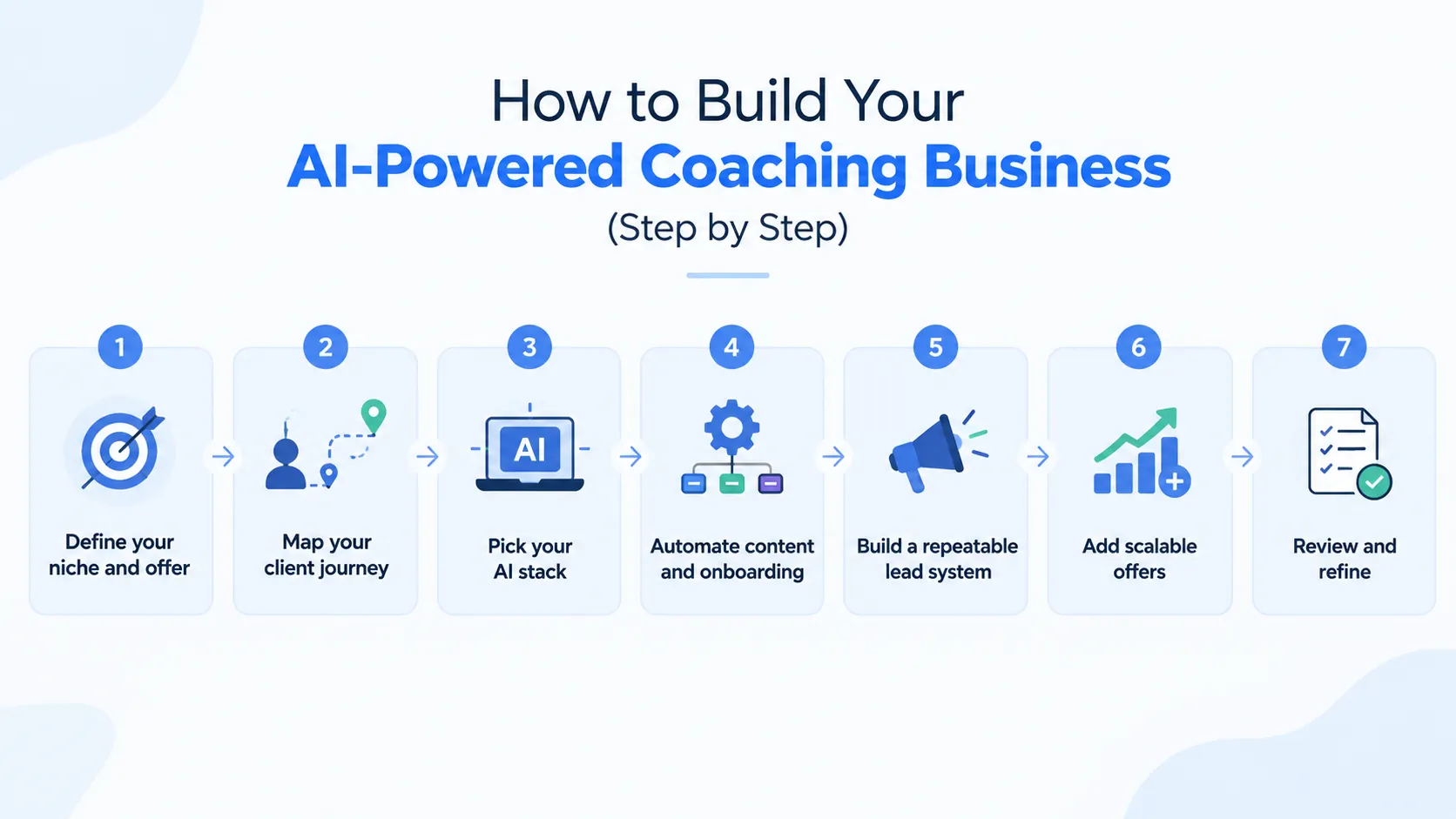
- Define your niche and offer. Write one sentence: “I help [who] get [result] in [time].” Watch out: “marketing coach” is too broad to be clear.
- Map your client journey. Stranger → follower → subscriber → discovery call → client. Watch out: skipping the step between follower and call.
- Pick your AI stack. Use the minimum stack above. Watch out: collecting tools you never open.
- Automate content and onboarding. Batch your content and use templates for welcome emails and intake forms. Watch out: automating the human parts, like your first call.
- Build a repeatable lead system. Content → lead magnet → email list → call. Watch out: posting without a clear next step.
- Add scalable offers. Group programs, courses or memberships alongside 1:1. Watch out: launching before your 1:1 results are proven.
- Review and refine. Check your numbers monthly and adjust. Watch out: changing everything every week.
Your first 30 days:
- Week 1: write your niche sentence and offer and choose 3 to 5 pillars.
- Week 2: set up your tools and save your voice guide.
- Week 3: record your first voice note and create your first batch.
- Week 4: publish, then review what got saves, replies and bookings.
Your weekly content workflow (the 2-hour-a-week plan)
This is how AI content creation for coaches fits into a busy week. It's how Maya makes 30 posts a month in two hours:
| Block | Time | What you do |
|---|---|---|
| Batch (capture) | 20 min | Record one voice note on this week's idea |
| Generate | 45 min | Use AI to turn it into 8 social posts, 1 email and 1 blog section |
| Edit | 40 min | Add your story, opinion and a specific detail |
| Schedule | 15 min | Queue everything in your scheduler |
Sample monthly content calendar:
| Week | Core idea | Social posts | Extras |
|---|---|---|---|
| 1 | Myth-busting | 8 | 1 email, 1 blog section |
| 2 | How-to or framework | 8 | 1 email, 1 blog section |
| 3 | Client story | 8 | 1 email, 1 blog section |
| 4 | Offer or invitation | 8 | 1 email, 1 blog section |
That's 32 posts, so you can drop two and still hit 30.
Time saved. Doing this manually takes roughly 8 to 10 hours a week by our estimate. With this workflow, it's about 2. That's six to eight hours a week back for clients, rest or sales calls.
How to use AI to make $10,000 a month as a coach
AI content creation for coaches doesn't make money by itself. Offers, clients and delivery do. What AI does is bring you more leads and more capacity. Here are three realistic paths to $10,000 a month:
- 1:1 coaching: 5 clients at $2,000, or 7 at about $1,500
- Group program: 20 members at $500
- Hybrid: 3 clients at $1,500 ($4,500), 10 group members at $400 ($4,000) and 50 low-ticket product buyers at $30 ($1,500)
How AI supports each path: consistent content brings more leads, AI-assisted prep speeds up delivery and the time you save lets you take on more clients or run a group.
The math that matters: content → leads → discovery calls → conversion → revenue. For example, if 1 in 4 discovery calls becomes a client, you need about 20 calls to sign 5 clients. If 1 in 10 new subscribers books a call, that's roughly 200 new leads a month. These numbers are illustrative, but they show why consistent content matters. It's what fills the top of the funnel.
Income disclaimer: these are examples, not promises. Results depend on your offer, niche, pricing and sales skills and AI doesn't guarantee income.
Want to work out your own numbers? Pick your offer, your price and your close rate and run them through the funnel math above. If you'd like help building the content engine that fills that funnel, talk to the Sociyell team.
How to measure what's working
Skip vanity numbers. Track what leads to clients:
- Discovery calls booked
- Email signups
- DMs and replies
- Saves and shares (a sign your content is useful)
Feed the results back into your topic bank. Each month, find your top 3 posts and ask why they worked. Add similar topics to your bank and drop the ones that consistently underperform.
Monthly review checklist:
- Which post drove the most calls or signups?
- Which pillar got the most saves?
- What did people ask in the comments?
- What will I repeat next month?
Common mistakes coaches make with AI content
- Posting raw AI output. Fix: always review the draft and add your own stories, opinions and examples before publishing.
- Using generic prompts. Fix: use the Role + Audience + Goal + Tone + Format formula and include your brand voice guide.
- Having no strategy. Fix: plan your content pillars and client journey before choosing AI tools.
- Over-automating. Fix: keep replies, DMs and discovery calls personal.
- Weak calls to action. Fix: end every post with one clear next step.
- Using outdated information. Fix: refresh your business and competitor reference files regularly and verify dates, statistics and claims against their original sources before publishing.
Build the AI coaching business that protects your future
AI is a long-term advantage, but only if you don't depend on it blindly. If every post, email and idea comes from a tool you don't control, a policy change or an outage can stop your whole business. A few ways to stay protected:
- Own your audience. Platforms change their rules. An email list belongs to you.
- Build a personal brand and point of view. Anyone can generate tips. Few can offer your angle. For AI content for personal brands, a clear perspective is the one thing others can't copy.
- Diversify platforms and revenue. Don't rely on one platform or one income stream.
- Keep your human edge. Empathy, accountability, community and trust are what clients pay for.
- Stay adaptable. Review your tools every six months and watch for changes in AI policies and platform rules.
The coaches who thrive won't be the ones who use the most AI. They'll be the ones who use it to be more present where it counts. That future is wide open for anyone willing to build it on purpose.
Conclusion: Stop creating, start scaling
Here's the whole idea of AI content creation for coaches in four lines. You already have the expertise. AI can turn one idea into ten assets. Two hours a week can fill a month. Your content works best when it sounds like you.
Remember that 9:40 pm moment, tired, with your tea gone cold and a feed that needed feeding? You don't have to spend your Tuesday night doing this anymore. Maya didn't find more time. She built a system and now one voice note a week does the work.
Your next step is simple. Record one voice note this week and run it through the 1→10 framework. Or, if you'd rather have it handled, Sociyell is a content creation agency for coaches that can take it off your plate. Explore the AI Gen production service to see how everyday photos and clips become on-brand content, or see how social media growth and management covers planning, publishing and reporting. Book a call and get back to the part you love, which is coaching.
Frequently asked questions
Can coaches use AI to create content?
Yes. Coaches use AI to draft, repurpose and schedule content from their own ideas, such as voice notes, client questions and webinars. It works best when you supply the expertise and edit the output, so the final post sounds like you and not like a template.
What is an AI-powered coaching business?
It's a coaching business that uses AI for marketing, session prep and day-to-day operations, while keeping the coaching relationship, judgment and accountability human. The goal isn't to automate coaching. It's to remove repetitive work like posting, follow-ups and admin, so you spend more of your week with clients.
Which AI tools do coaches actually need?
Start with three: a writing assistant for drafts, a design tool for carousels and graphics and a scheduler to publish consistently. Add video repurposing tools if you record video and automation tools once your process is steady. More tools rarely means more content. A simple stack you actually use beats a long list.
Which AI content platform has the best customization for coaches?
It depends on how hands-on you want to be. For DIY, a general AI assistant with a saved style guide is the most flexible for matching your voice. Marketing platforms add templates and brand voice settings. If you want customization without the work, a studio that trains AI around your brand, like Sociyell, does more.
Where can I hire AI content creation services for my coaching business?
Look at a content creation agency for coaches, freelance marketplaces like Upwork or Fiverr, AI-enabled creative studios and virtual assistants trained in AI workflows. Before you sign, ask how they learn your voice, who edits the AI drafts, how many revisions are included and how they protect client confidentiality.
Can a coach really make $10,000 a month using AI?
It's possible, but not guaranteed. AI helps you attract more leads through consistent content and frees up time for more clients or a group program, but income depends on your offer, pricing, niche and sales skills. Treat any income figure, including the examples in this guide, as an illustration and not a promise.
Will AI content sound robotic or fake?
It can, if you post it raw. AI content for personal brands only works when it sounds like you and generic prompts produce generic writing. Give the AI samples of your past posts, save a short style guide and always add your own story, opinion and one specific detail before publishing.
How often should a coach post?
Pick a rhythm you can keep for months, not weeks. For many coaches, that's 4 to 8 posts a week across one or two platforms, which is about 30 posts a month. Consistency matters more than volume, so start smaller if needed and increase once your weekly batching routine feels easy.
Is AI content bad for SEO or reach?
Not by itself. Search engines and platforms care about whether content is useful, original and made for people. Raw, generic AI output tends to blend in, while content that includes your real experience, examples and opinions has a better chance of standing out. Use AI for speed and your expertise for substance.